Title here
Summary here
Recommended sources:
738411212 files.SimHeaven is an optional addition for buildings, roads, and vegetation. It does not replace XPME’s imagery base package. After installation, check libraries and load order using the SimHeaven and overlays guide.
64-bit Windows 10 and Windows 11 are supported. Download and run the Windows installer; it installs WinFSP automatically.
The base package and X-Plane must be on NTFS volumes for WinFSP mounting. Restart the computer after installing WinFSP. If automatic installation fails, or another version was installed previously, uninstall the old version and reinstall the current one.
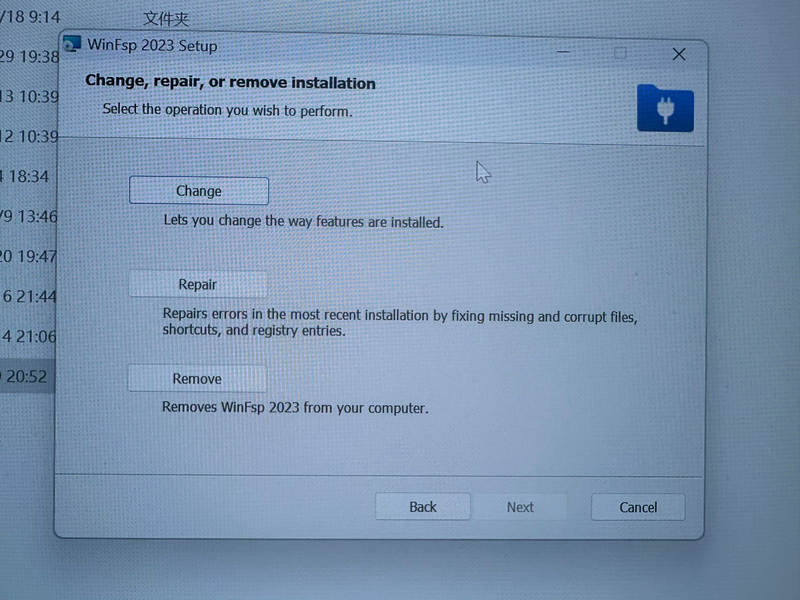
If the following dialog appears, WinFSP is already installed; select Cancel.
The application version and base-package version are separate; their numbers do not need to match. For X-Plane 12, use a target version currently offered by the downloader. X-Plane 11 base packages are limited to 3.1.0; later base-package versions are not compatible with X-Plane 11.
Configure a dedicated base-package directory, such as D:\xplane-scenery. Keep it outside both the X-Plane and XPME application installation directories and separate from the image cache. On Windows, use an NTFS volume and a path without Chinese characters. Allow space for both downloaded files and extracted data.
See the feature guide for the current interface and the difference between regional packages and X-Plane Original Base Package Enhancement.
When the standard download is slow, open Offline package download in the downloader. The Chinese interface offers 百度网盘下载 (Baidu Pan Download).
XPME_Europe/+50+000.zip on the offline download page belongs at D:\xplane-scenery\XPME_Europe\+50+000.zip. If a download script creates a downloads folder, copy the region folders inside it, without adding an extra downloads level under your base-package directory.An offline package is an alternative download method, not a fully offline operating mode for XPME; map imagery is still loaded on demand.
Important:
C:\Program Files (x86).Check each region’s installation result and version in the downloader, not just its enabled switch or whether ZIP files remain.
| File or directory | Meaning and action |
|---|---|
.zip |
A downloaded archive that the application verifies and installs. If cleanup after installation is enabled, removing the ZIP after installation is normal. |
.zip.aria2 |
An aria2 progress/resume control file, not a scenery archive to extract. Do not rename it to ZIP, extract it, or delete it during an active download. Older versions may leave residual control files, so their presence alone does not prove installation failed. |
_textures, Earth nav data |
The extracted data for an XPME regional package, inside its corresponding XPME_* region directory. |
textures, terrain |
Created or mounted by XPME while the service runs, not separate archives to download. Do not manually create, delete, or replace these mount directories. |
If the region directory really contains only .aria2 files and no installed data, check the installation result and logs even if the switch says enabled. Start with the download troubleshooting FAQ. If the problem persists, provide the region, application and base-package versions, failed stage, full error, and download logs rather than deleting every base package first.
Install Fuse-T through Homebrew or download it from https://github.com/macos-fuse-t/fuse-t/releases:
brew install macos-fuse-t/homebrew-cask/fuse-t
brew install sqlite libssh2 gettext
Install the .NET and ASP.NET runtimes from https://dotnet.microsoft.com/en-us/download/dotnet/thank-you/sdk-10.0.107-macos-arm64-installer, or run:
brew install --cask dotnet-sdkDrag XPlane Map Enhancement from the dmg file to the Applications folder to complete installation.
Linux users need FUSE3, aria2, the .NET 10.0 runtime, and the ASP.NET runtime. For Debian-based systems:
sudo apt install libfuse3-dev aria2 dotnet-runtime-10.0 aspnetcore-runtime-10.0Keep antivirus protection enabled during normal installation and use. If installation is blocked or scenery loading is unusually slow:
Users of security or VPN software such as Kaspersky and NordVPN have reported installation or scenery-loading problems. If you use these products and encounter these symptoms, check their blocking records, file-scanning settings, or network protection settings and follow the troubleshooting steps above.
If the problem persists, keep antivirus protection enabled and contact support with the name of your security or VPN software, the full error message, any relevant blocking records, and loading logs.